robotman.com.au
  • Home
  • About
    • Testimonials
    • SchoolList
    • Types of Robots
  • Workshops
    • Schools Bookings
    • Vacation Care
    • Teacher PL
    • Home Schoolers
    • Party & Other
    • Availability
  • Resources
    • Projects and tips
    • Recommended Sellers
    • Webtools
    • Handy Google Sheets
  • Contact
  • FAQ
  • Home
  • About
    • Testimonials
    • SchoolList
    • Types of Robots
  • Workshops
    • Schools Bookings
    • Vacation Care
    • Teacher PL
    • Home Schoolers
    • Party & Other
    • Availability
  • Resources
    • Projects and tips
    • Recommended Sellers
    • Webtools
    • Handy Google Sheets
  • Contact
  • FAQ
Search

BALLOON  BATTLES

Project Name: Balloon Battles
Controlled by: Remote Control
Construction Difficulty: Medium
General Comment. Adrenalin will pump in this one

Rules FOR STUDENTS


​You must use:
-1 NXT or EV brick
-3 motors

You must:
Build a robot that can pop another robot's balloon, before yours gets popped!

Tips For students


Tip: Cars with two wheels will turn easier.
Tip: Cars that use gears will go faster. A big gear on the motor and a small gear on the wheel will make the wheel turn faster. To use gears, the wheel's axel can't go through the motor's hole.

TEACHER INFO


​Grading option: The more balloons you pop, the better your score
​If you are recording random wins, make a copy of this Google Sheet to help you score 
​If you just want to count how many wins each team has use this Google Sheet
Picture
Additional Equipment needed
Balloons and wooden skewers, tooth-picks or something similar to pierce balloons. 

Remote Controlling? 

Please note. It seems as though the Commander App is no longer available in the app store. You should still be able to control it via the arrow keys through the older "icon-based" computer versions (no longer available for Apple). The original PC version can be downloaded from this web site

​
I found a PC and Mobile controller (NOT Apple) that may work 
here
Or another one from Google Play (NOT Apple) that may work here
It is possible to connect a Play Station controller to the EV3 hub, but it is a complicated process. One of your brightest students might like to complete this challenge! ​
If you can remote control from a PC, you might want to spice things up with a Makey-Makey!

SAMPLE  COMMANDER CONTROL (No longer available to download)

Picture
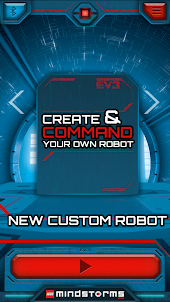
Open App and use arrows to "create and command"
Picture
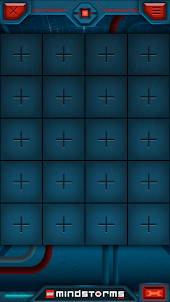
Click on any "+" symbol
Picture
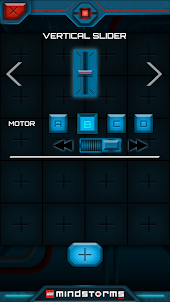
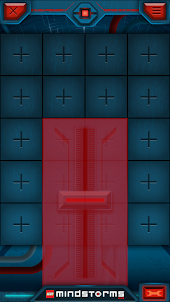
Scroll to find and add vertical slider
Picture
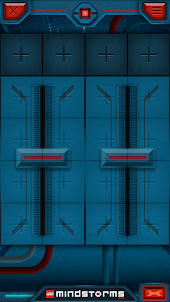
Place slider on left then click another "+"
Picture
Place next to other slider. (Take note of which motor they each control)
Picture
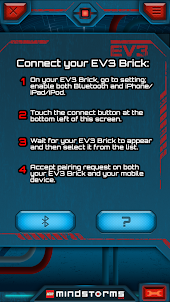
Click red SPANNER (bottom right) then connect via bluetooth (bottom left)
Picture
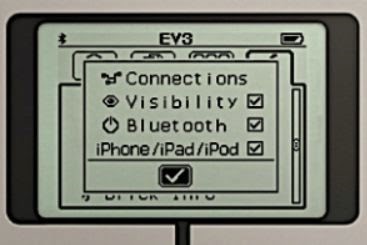
Please note, you will have to make sure your bluetooth turned on, on your tablet/phone AND on the EV brick. 

Under the 'spanner' tab make sure the ticks are on for Bluetooth and iPhone/iPad​/iPod

Classroom Tips
Score Sheets
Project Ideas

What people are saying:

"Steve aka Robot Man has been an absolute pleasure to have in our school"
"T
he kids didn't even realise they were learning... serious fun!"
"T
he experts and novice in every age group, fully engaged"
"Robot Man was fantastic"
"It was a fun experience with challenging and thought provoking activities"

Contact Us

  • Home
  • About
    • Testimonials
    • SchoolList
    • Types of Robots
  • Workshops
    • Schools Bookings
    • Vacation Care
    • Teacher PL
    • Home Schoolers
    • Party & Other
    • Availability
  • Resources
    • Projects and tips
    • Recommended Sellers
    • Webtools
    • Handy Google Sheets
  • Contact
  • FAQ