Project Name: Pinball Machines
Controlled by: Programming
Programming Difficulty: Easy
Construction Difficulty: Hard
General Comment. This is a great introduction to basic construction and basic programming
Controlled by: Programming
Programming Difficulty: Easy
Construction Difficulty: Hard
General Comment. This is a great introduction to basic construction and basic programming
Rules FOR STUDENTS
You must:
Build a pinball machine using the Mindstorms kit, other materials provided, and any other objects you find lying around at home!
You must have at least 2 flippers (middle bottom)
A ball shooter (on the right side)
A chance to get a second ball (so you can have two on the machine at once)
You can use any bits and pieces you have in your kit PLUS any bits of junk you think might help!
Tips For students
Tip: It's a good idea to sketch what your pinball machine will look like.
Tip: You can use motors for flippers, but you don't have to. "Mechanical" flippers can still do the job, then you will have more motors for other things.
SAMPLE PROGRAMMING
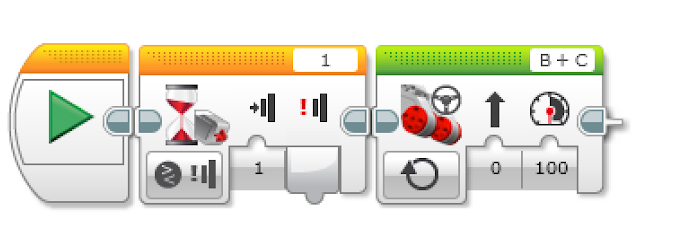
TEACHER INFO
I made a rule that if the students wanted to saw timber, they had to do it outside. Otherwise you end up with too much sawdust in the classroom.
Additional Equipment needed.
You will need to provide some timber for each group to use. I bought some MDF already cut to size and several one meter cuts of pine wood. I actually got one group of students to make all the board "templates" for the rest of the class to use, before the class. The timber can be any size, but should be a rectangle. 1200mm x 600mm is good, but just use whatever is available. You'll also have to supply many screws and at least three or four cordless drills and hand saws. Your EV kit probably came with one steel ball-bearing, but it is great if you can provide some more for each group, so each group has two. eBay is a good option for purchasing ball bearings. Marbles are a cheap alternative, but ballbearings seem more authentic!
If you want to use a rubric, make a copy of this Google Sheet to help you score. It's a tricky project to assign a mark to, so I developed a rubric that you can use. You need to go to FILE and MAKE A COPY for each GROUP, though. Just place an "x" in each yellow row. And move the 'big black dot' for 'effort'.
Additional Equipment needed.
You will need to provide some timber for each group to use. I bought some MDF already cut to size and several one meter cuts of pine wood. I actually got one group of students to make all the board "templates" for the rest of the class to use, before the class. The timber can be any size, but should be a rectangle. 1200mm x 600mm is good, but just use whatever is available. You'll also have to supply many screws and at least three or four cordless drills and hand saws. Your EV kit probably came with one steel ball-bearing, but it is great if you can provide some more for each group, so each group has two. eBay is a good option for purchasing ball bearings. Marbles are a cheap alternative, but ballbearings seem more authentic!
If you want to use a rubric, make a copy of this Google Sheet to help you score. It's a tricky project to assign a mark to, so I developed a rubric that you can use. You need to go to FILE and MAKE A COPY for each GROUP, though. Just place an "x" in each yellow row. And move the 'big black dot' for 'effort'.
|
|
Here is a video from a previous class who made pinball machines. It was when I used he old NXT kits, but you can do something very similar with the EV range.
In reflection, next time I do this, I will probably use smaller boards with smaller group sizes, It was a great project, but it took about 16 periods of class time for most groups to make something decent |