robotman.com.au
  • Home
  • About
    • Testimonials
    • SchoolList
    • Types of Robots
  • Workshops
    • Schools Bookings
    • Vacation Care
    • Teacher PL
    • Home Schoolers
    • Party & Other
    • Availability
  • Resources
    • Projects and tips
    • Recommended Sellers
    • Webtools
    • Handy Google Sheets
  • Contact
  • FAQ
  • Home
  • About
    • Testimonials
    • SchoolList
    • Types of Robots
  • Workshops
    • Schools Bookings
    • Vacation Care
    • Teacher PL
    • Home Schoolers
    • Party & Other
    • Availability
  • Resources
    • Projects and tips
    • Recommended Sellers
    • Webtools
    • Handy Google Sheets
  • Contact
  • FAQ
Search

Classroom tips

IMPORTANT EV3 Apps are becoming obsolete!

By July 2026 all original EV3 apps will no longer available via Lego. EV3 Apps for tablets are disappearing and will probably be unavailable to download by July 2026. 
The PC and Mac versions of the app may hang around a bit longer and be available from third party people like me, but they may not always be compatible with your operating system!!

A temporary solution, if you already own the installation files, is to back them up so you can install them later. But there is a good chance newer operating systems won't allow them to be installed, so my advice is, once you get them working don't update your IOS or Windows! 
Likewise, I know the latest Apple IOS for iPads and Phones are incompatible with some of the original EV3 apps, so if you happen to have them working, make a backup image of your tablet or iPad so you can put the apps on a new device later. Whether or not they work will be determined by what operating system you have. My rule of thumb is, if my apps are working, I don't update!

If you can't access or run the original Mindstorms programs, an alternative is PyBricks
Here's how you can get Pybricks for your EV3: 
  1. 1. Install the Pybricks firmware:
    You'll need to install the Pybricks firmware onto your EV3 brick using a Windows or macOS computer. This involves downloading the firmware and using a microSD card to transfer it to the EV3.
  2. 2. Install Visual Studio Code and the EV3 MicroPython extension:
    Visual Studio Code is recommended as the IDE for writing your Pybricks code. You'll also need to install the EV3 MicroPython extension within VS Code.
  3. 3. Write and run your code:
    You can then write your Python code using the EV3 MicroPython extension in VS Code, and upload and run it on your EV3 brick.

Pybricks for EV3 is based on ev3dev and does not support block-based coding, unlike the newer Pybricks versions for other LEGO hubs. However, it provides a powerful Python-based programming environment for the EV3


Coding with the newer Word Block version

This type of coding has become the most common for programming robots. It is often called "Scratch-based" because it looks and performs in a very similar way to the popular "Scratch". Although I liked the older icon-based version (below) I can see why they changed it to this version, and now I find the Word Blocks is way easier than the icon-based. 
Advantages are:
1) It is intuitive; (easy for students to understand and work out solutions to probems
2) Visually easy to comprehend because colours are used to separate different types of blocks
3) Seems more flexible in completing complex coding using variables and algorithms.

4) Can be used for simple to advanced coding ideas.
5) It is almost identical to the newer Spike Prime app
6) Makes bluetooth connection, from device to hub, simple. Rarely need or want to use cable.  
Picture

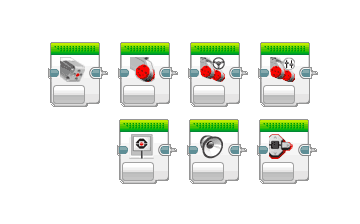
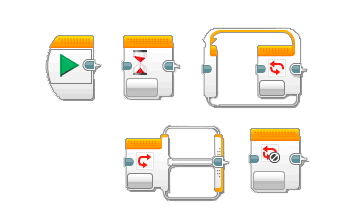
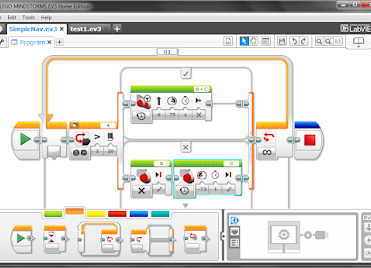
Coding icon-based version

​If you can find this, and get it running...
​The old app is useful because it can be very simple to use, but it also can be very complicated if you want it to! Its drag and drop block interface means you don't need any programming or coding experience to start using it. You can use an iPad version, but the computer version has a few more options. There is also an option to program directly on the EV Brick, but this is way more limited than the computer or tablet software options. For an introduction to EV programming click here
​

In a nutshell, create a program on your device, then upload it to the brick either via a cable or with bluetooth.
Picture
Picture
Picture
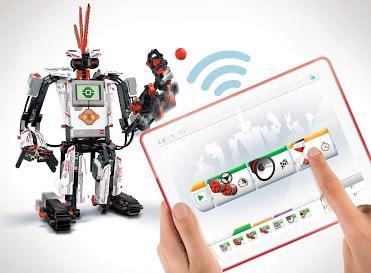
Tablet programming example
Picture
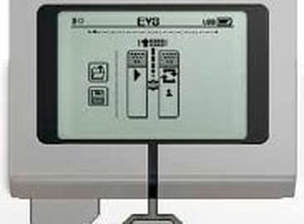
Programming on the EV3 Brick
Picture
Programming on a PC or Mac

More alternatives:

Swift Playgrounds
Swift Playgrounds is a revolutionary app for iPad that makes learning Swift interactive and fun. It requires no coding knowledge, so it is perfect for students just starting out. With Swift Playgrounds students can code and interact with their LEGO MINDSTORMS Education EV3 creations’ motors and sensors. Teachers can also use the free EV3 Animal Rescue Book, a lesson plan designed to teach how to code MINDSTORMS creations with real Swift code. The EV3 Animal Rescue Book engages and motivates students to solve a real-world problem as they help an injured robotic turtle move and interact with its surroundings.
CoderZ
Teachers can extend their LEGO MINDSTORMS Education EV3 activities with the CoderZ online 3D
simulation environment. Students can program their EV3 platform using either a Blockly code editor or Java
code, making the experience a great fit for beginners and experts alike.
Microsoft MakeCode
Students can program their LEGO MINDSTORMS Education EV3 with the MakeCode platform which communicates with the EV3 Brick via USB cable and offers both block and text editors to support learners at different coding proficiency levels. With the included simulator, students can tinker with their code, get instant feedback on how their program is running and debug the code before applying it to the EV3 brick. Students new to coding can start with colored blocks that they can drag and drop onto their workspace to construct their programs and when ready, move into a full-featured JavaScript editor with code snippets, tooltips, and error detection to help them along the way.
  • Firmware Update
  • Firmware Update through EV3 Device Manager
  • Getting started
  • Block-based coding and Simulation
  • Text-based coding​
Scratch 3.0
LEGO MINDSTORMS Education EV3 is compatible with Scratch 3.0, the next generation of Scratch. Scratch 3.0 expands how, what, and where you can create with Scratch. New tutorials using Scratch 3.0 with LEGO MINDSTORMS Education EV3 are also available.
ROBOTC
ROBOTC is a cross-robotics platform C-Based programming language for educational robotics systems.
Open Roberta Lab®:
The Open Roberta Lab offers visual programming for LEGO MINDSTORMS Education EV3 (as well as NXT and WeDo 2.0). The cloud-based solution is completely open source, free and adheres to the strict data protection guidelines of the EU. The Open Roberta platform communicates with the EV3 brick via Wifi and USB cable and is available in 14 languages. The Open Roberta Lab also comes with an integrated 2D-Simulation which minimizes hurdles for teachers and schools and makes it easy to integrate coding into the classroom. It is based on the universal programming language NEPO®® that can also be shown as Java, Python and C code. Open Roberta is developed by Fraunhofer IAIS as part of the largest organisation for applied research in Europe.
Python
LEGO MINDSTORMS Education EV3 uses MicroPython to unleash the power of Python programming. MicroPython is an optimized Python version for micro controllers and the skills learned with MicroPython can be directly used within Python programming. The coding editor used for this experience is the well-known Visual Studio Code from Microsoft. It is free for download to both Mac OS X, Windows and Linux. In the Visual Studio Code marketplace the user can find an EV3 MicroPython extension developed by LEGO Education. This extension provides all the needed code and commands to efficiently program the EV3 Brick. The experience requires the use of a Micro SD card in order to run the EV3 MicroPython image on the EV3 Brick. The experience comes with a Getting Started guide that includes installation set-up, get started help, code documentation and sample programs
Other Tips
Project Ideas
Score sheets

What people are saying:

"Steve aka Robot Man has been an absolute pleasure to have in our school"
"T
he kids didn't even realise they were learning... serious fun!"
"T
he experts and novice in every age group, fully engaged"
"Robot Man was fantastic"
"It was a fun experience with challenging and thought provoking activities"

Contact Us

  • Home
  • About
    • Testimonials
    • SchoolList
    • Types of Robots
  • Workshops
    • Schools Bookings
    • Vacation Care
    • Teacher PL
    • Home Schoolers
    • Party & Other
    • Availability
  • Resources
    • Projects and tips
    • Recommended Sellers
    • Webtools
    • Handy Google Sheets
  • Contact
  • FAQ